

Maximizing the impact of your Google Ads budget is essential for driving measurable results and ensuring every dollar works hard for your business. With digital advertising becoming increasingly competitive, businesses need a strategic approach to get the most from their campaigns. Expert tips for optimizing your Google Ads budget focus on improving ad performance, reducing wasted spend, and increasing ROI.
By leveraging proven strategies—such as refining keyword targeting, adjusting bids based on performance data, and testing ad creatives—you can make informed decisions that enhance campaign efficiency. These insights not only help stretch your advertising budget further but also drive higher-quality traffic, generate more leads, and boost conversions. Whether you are a seasoned marketer or managing ads for the first time, applying these expert recommendations will provide a clear roadmap to smarter, results-driven Google Ads campaigns.
What is Google Ads Budget Optimization?
Google Ads budget optimization is the strategic management of your pay-per-click (PPC) advertising budget to achieve the highest return on investment (ROI). It involves allocating your budget across campaigns, ad groups, and keywords to maximize results. Successful optimization requires continuous monitoring and adjustments to reduce wasted spend, improve ad performance, and ensure every dollar contributes to driving leads, traffic, and conversions.
Read More: 9 Quick Strategies to Increase Your Click-Through Rate in 15 Minutes
7 Ways to Optimize Your Google Ads Budget
Maximizing your Google Ads budget ensures higher ad performance while minimizing wasted spend. Here are seven effective strategies to optimize your advertising budget:
- Calculate Conversion Value – Track the revenue each conversion generates to allocate budget where it delivers the best ROI.
- Leverage Historical Data – Use past campaign performance to forecast future spending and make smarter budgeting decisions.
- Run Test Campaigns – Experiment with small-scale campaigns to identify top-performing ads and strategies.
- Review Keyword Search Terms – Regularly analyze search queries to refine targeting and avoid irrelevant clicks.
- Experiment with Ad and Landing Page Copy – Test variations to improve engagement and conversion rates.
- Improve Quality Score – Enhance ad relevance, landing page experience, and CTR to lower costs and boost performance.
Calculate Your Conversion Value
Before optimizing your Google Ads budget, it’s crucial to understand the value of each click. Many businesses overlook the importance of knowing their lead value or cost per lead.
“Budget optimization should start with understanding the value generated from each click,” says Dawson. “Your budget should support a positive return on ad spend, and reviewing conversion value ensures it’s allocated appropriately.”
Conversion value represents the average worth of each conversion. Calculate it by dividing your total conversion value by the number of conversions.
“Knowing your conversion values helps plan realistic budgets,” Dawson adds. “It simplifies budget allocation and management by giving you a clear picture of where your ad spend delivers the most return.”
Use Historical Data to Predict Future Ad Spend
Analyzing past Google Ads performance helps set a realistic budget for future campaigns. Start by exporting key metrics from your account, such as daily and monthly spend, clicks, and conversions.
Review this data to identify trends and patterns. For example, some keywords may consistently cost more, requiring a larger budget, while certain campaigns or keywords deliver a higher return on ad spend (ROAS). Seasonal trends can also highlight periods of increased ad spend.
By understanding these patterns, you can make informed decisions, allocate your budget more effectively, and ensure your campaigns are set up for maximum efficiency and ROI.
Run Test Ad Campaigns
Testing new campaigns or ad formats allows you to identify the most effective ways to spend your Google Ads budget. Whether you’re new to Google Ads or trying a different strategy, small-scale test campaigns reveal which ads, targeting options, and keywords deliver the best results. Running tests helps minimize wasted spend and informs smarter decisions for scaling your campaigns efficiently.
Choose the Right Keywords
Selecting the right keywords is crucial for a successful test campaign. Focus on keywords that align with your campaign goals, including long-tail keywords, which are more specific and often indicate purchase intent.
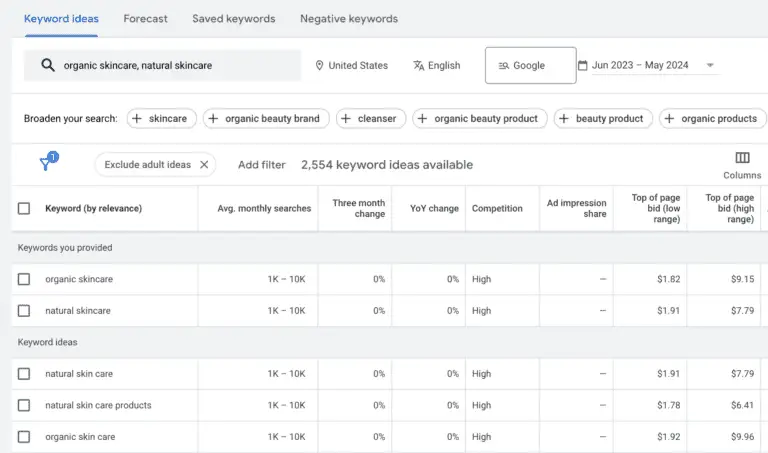
Start your research with Google Keyword Planner to explore search volume, competition, and bid ranges. You can also use Google’s ad group suggestions by entering your landing page URL to discover additional relevant keywords, though this should complement—not replace—your own research.
For beginners, start small. Testing around 10 well-chosen keywords allows you to gather meaningful data without overspending, helping you identify which terms drive the best results before scaling your campaign.
Determine Your Bids
After selecting your keywords, set a bid for each click based on its value and your campaign goals. The ideal bid depends on factors like campaign type, keyword cost, and past performance.
Start by considering how much a single click is worth relative to your product or service. For example, avoid bidding $10 on a keyword for a product that only sells for $20. Smart bidding ensures your budget is spent efficiently while maximizing potential return on ad spend (ROAS).
Set a Test Budget
For meaningful results, aim for at least 100 clicks per ad before evaluating performance. For example, testing 10 keywords with an average CPC of $3 would require a minimum budget of $3,000.
Monitor your campaigns closely to prevent wasted spend. If an ad isn’t performing or failing to convert, pause it immediately to avoid unnecessary costs. Setting a clear test budget ensures you gather actionable data while keeping your overall ad spend under control.
Analyze the Results
Test campaigns provide valuable data to guide future budget and strategy decisions. Start by reviewing click-through rate (CTR), calculated by dividing clicks by total impressions. CTR reveals which keywords are visible to users and compelling enough to generate clicks, helping you identify high-performing terms.
Next, evaluate the conversion rate—the percentage of users who complete a desired action after clicking. Always consider conversion rate alongside cost per conversion. For example, a campaign may have a high conversion rate, but if the cost per conversion exceeds the revenue generated, it won’t deliver a positive return on ad spend (ROAS).
By analyzing CTR, conversion rates, and costs together, you can make data-driven decisions that optimize your budget, maximize ROI, and improve the effectiveness of future campaigns.
Review Keyword Search Terms Regularly
Regularly reviewing keyword search terms helps identify which keywords drive the most traffic and conversions. Focus on high-performing keywords to maximize results and adjust your campaigns accordingly.
Equally important is identifying underperforming keywords. “For Search Network campaigns, reviewing search terms linked to keyword clicks can reduce wasted spend,” says Dawson.
Incorporate negative keywords to filter out non-converting traffic. Adding terms that are unlikely to generate qualified leads ensures your budget is directed toward high-performing keywords. For instance, a home renovation business might use negative keywords like “DIY,” “cheap,” or “do it yourself” to avoid clicks from users unlikely to convert.
By regularly refining both positive and negative keywords, you can optimize ad spend, improve campaign efficiency, and drive better ROI.
Experiment with Ad and Landing Page Copy
Testing ad and landing page copy is a powerful way to maximize your Google Ads budget. Use A/B testing to evaluate one element at a time, ensuring you can identify which changes impact conversions.
“Experimenting with ad copy and landing page variants can positively impact your budget,” says Dawson. “By refining copy to educate users before they click, you can reduce irrelevant clicks and stretch your budget further.”
For example, in B2B marketing, targeting enterprise users with precise messaging can prevent clicks from B2C users searching similar keywords. Adjusting ad and landing page copy ensures your budget focuses on users most likely to convert, increasing ROI and campaign efficiency.
Improve Quality Score to Enhance Performance
Google Ads Quality Score affects both your ad rank and performance, directly influencing the cost per click (CPC). A higher Quality Score can lower CPC, allowing you to get more clicks for the same budget.
Improving your Quality Score involves creating relevant ad copy, optimizing landing pages, and maintaining high click-through rates (CTR). By focusing on these elements, you can reduce wasted spend, increase ad efficiency, and make the most of your Google Ads budget.
What is Quality Score?
Quality Score is a 1–10 rating Google assigns to your ads based on three key factors:
- Expected Clickthrough Rate (CTR): The likelihood your ad will be clicked.
- Ad Relevance: How closely your ad matches the user’s search intent.
- Landing Page Experience: The relevance and user-friendliness of your landing page for those who click your ad.
Google evaluates your performance against other advertisers targeting the same keywords over the past 90 days, rating each element as above average, average, or below average. A higher Quality Score can improve ad placement, lower costs, and make your budget more efficient.
How to Check Your Quality Score
To view your Google Ads Quality Score, follow these steps:
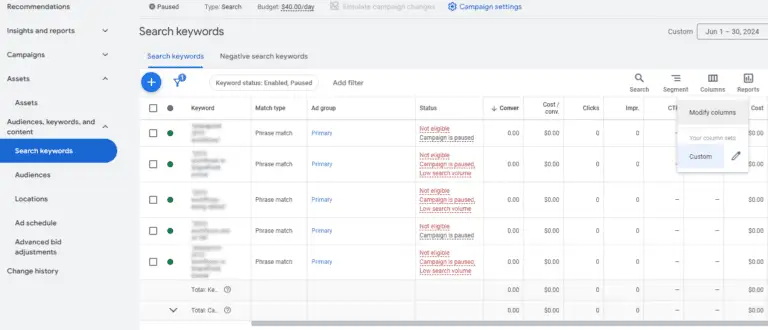
- Log into your Google Ads account and select Campaigns.
- Click the Audiences, Keywords, and Content drop-down, then select Search Keywords.
- In the upper-right corner of the table, click the Columns icon.
- Under Modify Columns for Keywords, open the Quality Score section.
- Here, you can view your overall Quality Score and the status of each component—Expected CTR, Ad Relevance, and Landing Page Experience.
- Select the metrics you want to include in your table and click Apply.
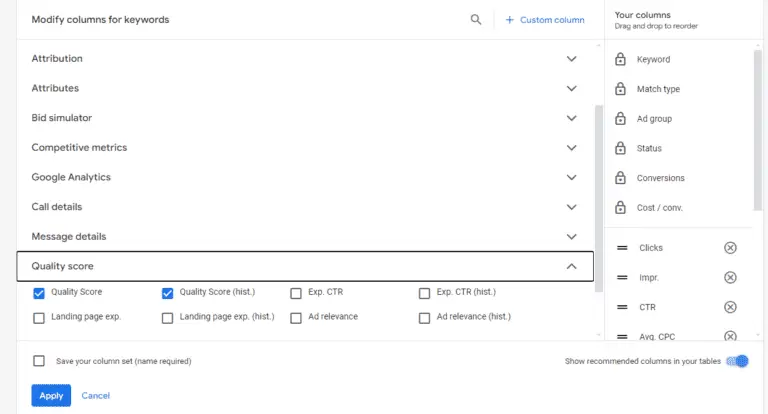
This allows you to track and monitor your Quality Score, identify areas for improvement, and optimize your campaigns for better ad performance and lower costs.
How to Improve Your Quality Score
Quality Score affects ad performance, ad rank, and cost per click (CPC), making it a key factor in maximizing your Google Ads budget.
Here are strategies to improve your Quality Score:
- Choose Relevant Keywords: Target specific, relevant search terms that attract users genuinely interested in your offer.
- Align Ad Copy with Search Intent: Ensure your ad copy addresses the user’s needs and matches the intent behind their search queries.
- Optimize Landing Pages: Match your landing page content to your ad copy for a seamless experience. Ensure pages are mobile-friendly, fast-loading, easy to navigate, and include a clear call-to-action (CTA).
By focusing on these areas, you can enhance Quality Score, reduce CPC, and make your ad budget more effective.
How Google Ads Campaign Budgets Work
Before optimizing your Google Ads budget, it’s important to understand how campaign budgets function. Your budget determines how much you’re willing to spend on a campaign daily or monthly, influencing ad delivery, reach, and performance. Properly setting and managing budgets ensures your campaigns run efficiently, prevents overspending, and helps maximize return on investment (ROI).
Average Daily and Monthly Budget
Google Ads lets you set either a daily or monthly budget for your campaigns. The daily budget is the average amount you’re willing to spend each day. Actual daily spend may vary depending on factors like competition and ad performance.
To calculate your monthly budget, multiply the daily budget by 30.4. This gives the monthly spending limit, which is the maximum amount you can be billed for that campaign in a month. Understanding these budgets is key to planning and optimizing your ad spend effectively.
Shared Budget
Google Ads also allows you to set a shared budget, which distributes a single budget across multiple campaigns.
For example, if you have a $100/day shared budget for two campaigns, each initially allocated $50/day, and Campaign #1 only spends $30 due to fewer impressions, the remaining $20 can automatically be reallocated to Campaign #2.
Using a shared budget helps maximize overall campaign performance without the need to adjust individual campaign budgets manually, ensuring your ad spend is used efficiently.
How Much Do Google Ads Cost?
The cost of Google Ads typically ranges from $2 to $5 per click, though actual costs vary based on factors like industry, keywords, bids, and overall budget. Market trends and shifts in consumer behavior can also affect the average cost-per-click (CPC) over time.
When estimating costs, consider PPC management fees as well. Partnering with a PPC agency can help optimize campaigns, reduce wasted spend, and achieve better results more efficiently. Management costs vary depending on the agency’s fee structure and the size of your PPC budget.
How Much Should I Spend on Google Ads?
Your Google Ads budget depends on factors such as industry, keywords, and campaign objectives. While there’s no strict minimum, a very low daily budget—just a few dollars—typically won’t deliver meaningful results.
For most businesses, a starting budget of $1,500–$3,000 per month is recommended. If you’re new to Google Ads, begin with the lower end of the range to minimize wasted spend while learning what works. Gradually increase your budget as you identify high-performing campaigns and keywords.
Frequently Asked Questions
What is Google Ads budget optimization?
It’s the process of strategically managing your PPC budget to maximize ROI and minimize wasted spend.
How do I calculate my Google Ads budget?
Consider factors like industry, keywords, campaign goals, and historical ad performance to determine a realistic budget.
What is a Quality Score and why is it important?
Quality Score (1–10) measures ad relevance, expected CTR, and landing page experience, affecting CPC and ad rank.
How can I improve my Google Ads Quality Score?
Use relevant keywords, align ad copy with search intent, and optimize landing pages for user experience and speed.
Should I use a daily or shared budget?
Daily budgets control spending per day, while shared budgets distribute funds across multiple campaigns for efficiency.
How much do Google Ads cost?
Costs vary by industry, keywords, and competition, typically ranging from $2–$5 per click, excluding management fees.
How do I know if my campaigns are effective?
Monitor CTR, conversion rates, cost per conversion, and ROAS to measure performance and make data-driven adjustments.
Conclusion
Optimizing your Google Ads budget is essential for maximizing ROI, reducing wasted spend, and driving meaningful results. By understanding campaign budgets, monitoring performance metrics, testing ads and landing pages, refining keywords, and improving Quality Score, you can make informed, data-driven decisions. Whether you’re a beginner or an experienced marketer, applying these expert strategies ensures your ad spend is efficient and effective.
